
Sustainable web design is about building websites that perform brilliantly while minimising their environmental impact. At Solve, this approach is central to what we do. As a certified B Corp and green hosting provider, we combine low-impact design with 100% renewable-powered hosting to create websites that are fast, functional and low-impact.
Your website has a carbon footprint, and it may be larger than you think. In 2026, global data centre electricity consumption is projected to reach 565 TWh, up from 447 TWh in 2025, reflecting the rapid growth of AI and digital services. Recent research also suggests data centres could account for nearly 3% of global electricity use by 2030, with emissions reaching about 440 million tonnes of CO2 if current trends continue
The good news is that the actions which reduce a website’s environmental impact are, almost without exception, the same actions that make it faster, easier to use and better ranked in Google and AI search. Sustainable web design isn’t a trade-off against performance. It is performance.
In this guide, we’ll cover what sustainable web design actually means, the business benefits, 10 practical actions you can take starting today, how to measure your own site’s footprint, and real examples of it working in practice, including a look at how we approach it here at Solve.
Table of Contents
What Is Sustainable Web Design?
Sustainable web design is about creating websites that run efficiently over the long term, reducing energy use and environmental impact at every stage. It goes beyond surface-level aesthetics or short-term fixes by considering the full life cycle of a site, from hosting and build through to maintenance and everyday use.
A more sustainable website uses fewer resources, loads quickly, and lasts longer without constant overhauls. In short, it’s about designing digital experiences that are both functional and beautiful, while staying mindful of their impact on the planet.
Traditional websites were often built with little thought for environmental impact. Oversized images, autoplay videos and poorly optimised code all demand unnecessary data and energy. Individually these choices may seem harmless, but across thousands of visits they add up to significant emissions. Reducing that footprint isn’t a niche technical concern any more. It’s a practical, achievable business decision, and one of the most direct ways a business can cut its digital carbon footprint.
8 Key Benefits of Sustainable Web Design
1. Reduced Carbon Footprint
The most obvious benefit of sustainable web design is reducing your company’s carbon footprint. By streamlining design, optimising images and using green hosting, you can lower your energy consumption and the associated emissions, helping you make genuine progress toward sustainability targets.
2. Faster Website Performance
Energy-efficient, lean websites load faster. Removing unnecessary scripts, compressing media and focusing on efficiency all deliver lightning-quick performance. Faster load times improve user satisfaction and directly impact sales, conversions and SEO. Research shows that websites loading in 1 second can convert around 3 times better than those loading in 5 seconds, especially for B2B sites.
3. Lower Hosting Costs
Every file stored and every request processed uses server resources. A lighter, more efficient website uses less storage and bandwidth, often resulting in lower hosting fees. For businesses running large-scale platforms or e-commerce sites, these savings can add up significantly over time.
4. Stronger Brand Reputation
Sustainability is a powerful differentiator. Consumers are increasingly looking for eco-conscious brands, and your website is one of your most visible assets. A business that actively pursues sustainable web design demonstrates values in action, signalling responsibility, transparency and genuine care for the planet’s future. Many of our clients proudly display their ‘powered by green hosting’ badge for exactly this reason.

5. Improved Search Engine Optimisation (SEO)
Google rewards fast, efficient websites. Page load speed and mobile optimisation are critical ranking factors, and sustainable web design naturally improves both. By minimising scripts, reducing file sizes and structuring clean code, websites perform better in search, meaning more organic traffic and stronger visibility.
6. Better User Experience (UX)
Few things are more frustrating than a slow website that makes it hard to find what you need. Sustainability and usability go hand in hand. A clean, well-structured site is easier to navigate, quicker to load and accessible across every device, which reduces bounce rates and improves overall satisfaction. Simplifying site architecture also reduces the number of clicks needed to find information, saving visitors time, energy and frustration.
7. Long-Term Cost Efficiency
Flashy websites with heavy features often need constant fixes and redesigns. Sustainable websites are built with longevity in mind. Efficient code, scalable infrastructure and a clear content strategy reduce the need for frequent redevelopment, cutting maintenance costs over time.
8. Competitive Advantage in a Green Market
Sustainability has become a key market differentiator. Businesses that adopt eco-friendly practices early gain an edge over competitors who lag behind. As regulations tighten and customer expectations rise, companies that demonstrate sustainable principles throughout their operations are already positioning themselves as leaders, and that credibility can help secure partnerships, funding and procurement opportunities where responsibility is a deciding factor.
How to Build a Sustainable Website: 10 Practical Actions
Sustainable website design doesn’t mean compromising on looks or performance. In fact, the actions that reduce a site’s environmental impact are the same ones that make it easier to use and better ranked in Google. Here are 10 practical steps to build or transform your website into a greener, leaner digital presence.
1. Switch to Green Hosting
The single highest-impact change you can make is switching to a green hosting provider. Hosting is responsible for a significant share of a website’s energy consumption, and most traditional hosting still runs on fossil-fuel-powered data centres.
Green hosting uses servers powered entirely by renewable energy sources such as wind and solar, cutting your digital carbon footprint directly with no changes needed to the site itself. At Solve, every website we host runs on 100% renewable energy. We’re a certified B Corp and one of the UK’s greenest hosting providers, and we plant trees with every hosting plan. Look for providers verified by the Green Web Foundation, or ask your current host directly about their energy source. If they can’t answer clearly, it’s time to switch.
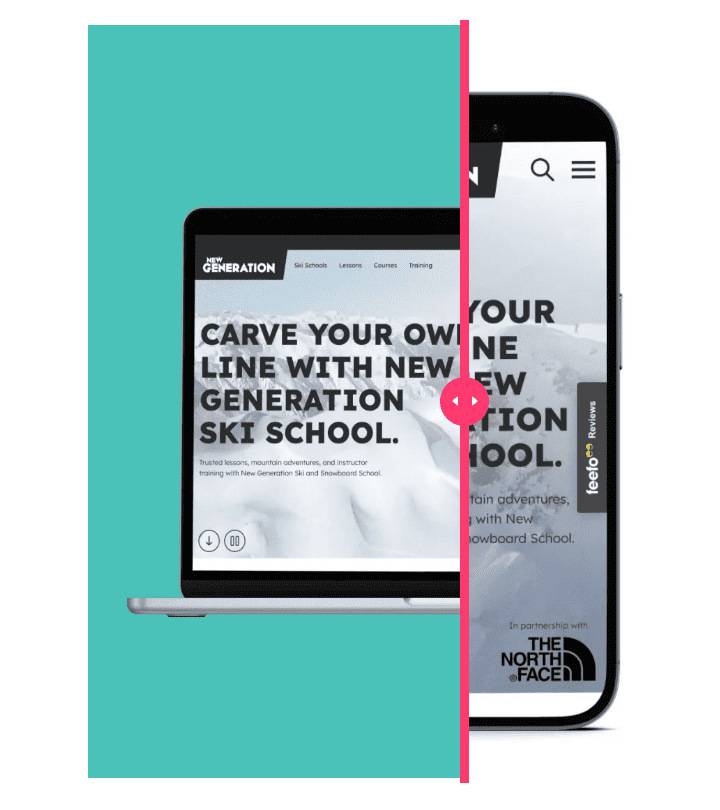
For Ski New Generation, we created a custom-built site that is intuitive, inspiring, and designed for long-term performance. By optimising media files, limiting energy-intensive features, and keeping content clear and purposeful, the site is both user-friendly and low impact – it’s green-hosted too.
2. Choose a Lightweight, Efficient Framework
Not all website builders are equal. Some load unnecessary scripts, plugins and resources on every page, adding weight and energy use with every visit. Low-carbon design starts at the build stage.
- Avoid page builders that load large JavaScript libraries globally
- Use a theme or framework built around performance, not drag-and-drop convenience
- Regularly audit which scripts and plugins are actually active and necessary
3. Optimise Your Cache
A website cache stores temporary copies of pages so returning visitors don’t reload everything from scratch. Less data transferred means less energy used and a faster experience.
- Use a reputable caching plugin
- Enable browser caching so repeat visitors load pages from local storage
- Set sensible expiry times: longer for static assets like logos, shorter for frequently updated content
4. Resize and Compress Your Images
Images are consistently the biggest contributor to page weight. A single unoptimised image can be larger than an entire well-built web page.
- Convert images to modern formats such as WebP or AVIF, which offer the same visual quality at 25 to 50% smaller file sizes than JPEGs
- Resize images to their maximum display size before uploading rather than relying on CSS to scale them down
- Use compression tools to shrink file sizes without visible quality loss
5. Implement Lazy Loading
Most websites load every image and video as soon as a page is requested, including content far below the fold that may never be seen. Lazy loading changes this: images and videos only load when they’re about to enter the visitor’s viewport, which can dramatically cut initial load time. It’s supported natively in modern browsers and is standard practice in sustainable web design.
6. Use Video Strategically
Video engages visitors, but it’s also one of the heaviest content types in terms of data and energy. A single autoplaying background video can use more bandwidth in seconds than an entire optimised page.
- Embed video from platforms like YouTube or Vimeo rather than hosting it directly on your server
- Disable autoplay and let users choose whether to watch
- Use a static poster image that only triggers video playback on click
7. Audit and Clean Up Your Website Regularly
Every piece of outdated content, unused plugin and orphaned image adds weight and increases your environmental impact. A regular website audit keeps things lean, and it’s good practice from an SEO perspective too, since thin or outdated content can drag down overall site quality in Google’s eyes.
- Delete or consolidate pages that are outdated, thin or duplicated
- Remove inactive plugins and unused media
- Check for and fix broken links
8. Simplify and Improve Your Navigation
Efficient navigation isn’t just better for user experience, it’s better for the planet. When visitors find what they need in fewer clicks, they use less data and have a more satisfying journey.
- Ensure your most important pages are reachable within two clicks of the homepage
- Avoid complex mega-menus that load large amounts of HTML and CSS
- Use a clear hierarchy across main navigation, sub-navigation and footer links
9. Audit Your Third-Party Scripts
Every visit loads a queue of background scripts, analytics, chat widgets, pixels, cookie tools and more. Each one adds network requests, page weight and energy use, often without you realising it’s still there.
- Use Google Tag Manager‘s preview mode to see every script firing on each page
- Remove tracking pixels for platforms you no longer use
- Consider a lightweight, privacy-first analytics tool as an alternative to heavier platforms
10. Consider Your Fonts
Typography is often overlooked, but it’s one of the easiest wins. Custom web fonts can add 100 to 400KB to page weight depending on how many variants are loaded, and most sites load several more weights than they actually need.
- Audit how many font families and weights you’re really using
- Host fonts locally rather than loading them from a third-party server
- Consider a variable font, or system fonts entirely for utility pages like your privacy policy or contact page
How to Measure Your Website’s Carbon Footprint
You can’t improve what you don’t measure. Before making changes, it’s worth establishing a baseline using free tools:
- Website Carbon Calculator (websitecarbon.com): an instant estimate of CO2 per page view, with an A+ to F rating and a comparison against other sites
- Ecograder (ecograder.com): a more detailed report scoring sustainability, UX and performance, pulling in real data from Google PageSpeed Insights
- Green Web Foundation Check (thegreenwebfoundation.org): instantly checks whether your hosting provider runs on verified renewable energy
At Solve, we run every site we build through these tools as part of our launch process, and our own hosting is verified by the Green Web Foundation. If you’d like a free carbon audit of your current website, get in touch and we’ll show you where the biggest wins are.
Sustainable Web Design and Regulation
For most UK businesses, sustainable web design has so far been a values-driven choice. That’s starting to change.
The EU’s Corporate Sustainability Reporting Directive (CSRD) requires many large EU companies and listed SMEs to report on environmental impacts, which may include digital-related impacts where material. This primarily affects larger organisations, but the supply chain effect means it’s increasingly relevant to UK SMEs that supply or partner with EU-based businesses. The W3C’s Sustainable Web Interest Group has also published updated Web Sustainability Guidelines, moving toward becoming an official W3C standard, and these are expected to become a baseline reference for UK government digital procurement and B Corp certification requirements.
You don’t need to act on regulation today, but the direction of travel is clear. Businesses that build sustainably now will face far less disruption as reporting requirements tighten. As a certified B Corp, Solve already operates to standards that anticipate where this is heading.
Real Examples of Sustainable Web Design in Action
Brands Leading the Way
- Patagonia added a small carbon badge to its website footer showing the CO2 cost of each page view and how it’s offset, reinforcing its sustainability credentials with exactly the audience that matters most to it.
- The Guardian reduced its digital carbon emissions by removing infinite scroll and lazy-loading its advertising, then published the data publicly. Readers responded well to the transparency, and the performance gains benefited SEO rankings too.
- Low-Tech Magazine runs a version of its website on a solar-powered server that can go offline when it’s cloudy. Using dithered images, system fonts and no JavaScript, the site weighs under 100KB per page and loads near-instantly. It’s an extreme example, but it shows what’s possible when sustainability is treated as a genuine design constraint rather than an afterthought.
You don’t need to be Patagonia to make sustainable web design part of your brand story.
UK consumers are increasingly choosing businesses that demonstrate environmental values in action, and small, credible steps such as displaying a green hosting badge or sharing your carbon score can differentiate you from competitors who haven’t thought about this at all.
Solve Clients Already Leading the Way
At Solve, we use our own IO framework to guide every project, bringing together five key elements: digital sustainability, accessibility, visibility, performance and user experience. Here are three clients putting that into practice.
Ski New Generation: a custom-built site that’s intuitive, inspiring and designed for long-term performance. By optimising media files, limiting energy-intensive features and keeping content clear and purposeful, the site is user-friendly, low-impact and green-hosted.
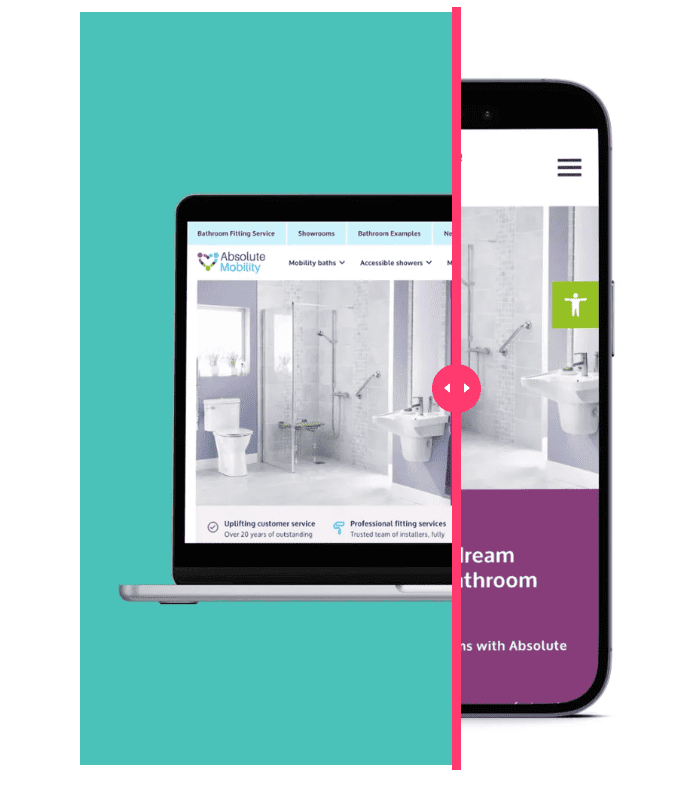
Absolute Mobility: a professional new website with advanced accessibility features built in. Efficient code, fast and secure green hosting, and purposeful content combine to meet every customer’s needs while minimising its digital footprint.
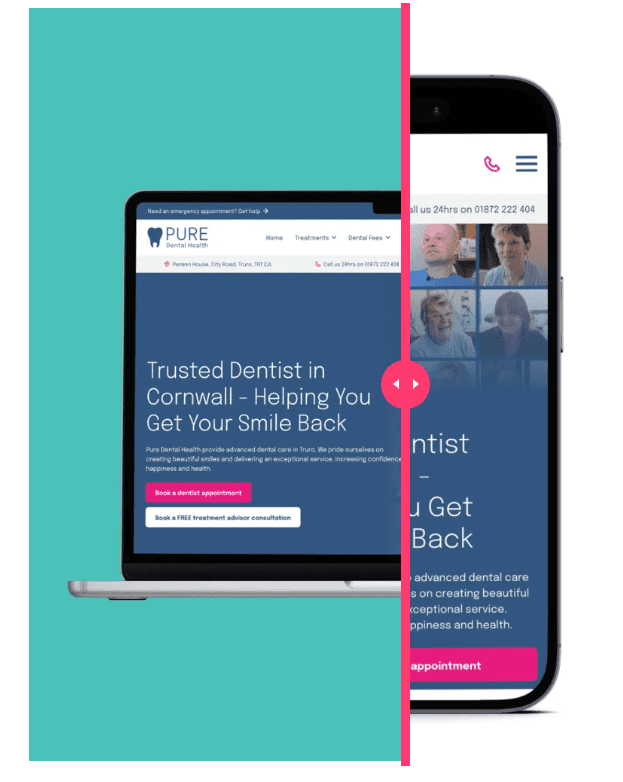
Pure Dental: a high-performing site built with optimised media, efficient code and secure green hosting, designed around user experience, visibility and sustainability to support long-term growth online.
Why Sustainability Is Built Into Everything We Do
We believe the way a company chooses to do business speaks volumes about that company, and everything we do is driven by our ethos of using our powers for good.
Every website we host, over 250 worldwide, runs on 100% renewable energy, and our own office is solar-powered too. We’re a certified B Corp, meaning we’re legally required to consider the impact of our decisions on our workers, customers, suppliers, community and the environment. We also volunteer our digital marketing skills to good causes including Surfers Against Sewage and Reefdoctor, because we believe that combining profit with genuine purpose is how a digital agency should operate.
This isn’t a marketing angle bolted onto our services. It shapes how we build every website, host every client, and advise every business we work with, and you can read more about the standards we hold ourselves to in our Code of Ethics.

Ready to Make Your Website Sustainable?
At Solve, we believe great design and sustainability go hand in hand. Our team specialises in building websites that are efficient, future-proof and low-impact, and we’ve helped hundreds of businesses build sites that perform brilliantly and tread lightly on the planet.
If you’re ready to reduce your digital footprint while improving performance, reputation and long-term efficiency, we can help. Get in touch to start building a sustainable website that works better for your business and the planet, or ask us about a free carbon audit of your current site.
Sustainable Web Design FAQs
What is sustainable web design?
Sustainable web design is the practice of building websites that minimise their environmental impact. It covers efficient coding, optimised images, lightweight frameworks, green hosting and thoughtful UX, reducing energy use and carbon emissions without compromising performance or user experience.
What are the best practices for sustainable web design?
Switch to green hosting powered by renewable energy, compress and convert images to WebP or AVIF, implement lazy loading, choose a lightweight framework, remove unused scripts and plugins, host video externally, optimise your fonts, and audit your site regularly.
Does sustainable web design impact SEO?
Yes. Sustainable web design and good SEO are strongly aligned. A leaner, faster site scores better on Core Web Vitals and loads more efficiently on mobile. Reduced page weight, compressed images, lazy loading and green hosting all directly improve the performance metrics Google uses to rank pages.
How much CO2 does a website produce?
The average webpage produces roughly 0.5g of CO2 per page view. For a site with 10,000 monthly visits, that’s approximately 60kg of CO2 a year, though heavier sites with video, unoptimised images and high traffic can produce significantly more. You can check your own site’s emissions for free at websitecarbon.com.
What is green web hosting?
Green web hosting powers website servers using 100% renewable energy sources such as wind and solar, rather than fossil fuels. It reduces the carbon footprint of running a website at the server level. Some providers, including Solve, also plant trees and hold certifications such as B Corp to verify their environmental commitments.
What makes a website unsustainable?
The most common causes are unoptimised images in outdated formats, autoplay video hosted directly on the server, excessive third-party scripts and tracking pixels, heavy JavaScript frameworks, fossil-fuel-powered hosting, and bloated page builders that load unnecessary code on every visit.