

CDN, DNS, PHP, SSL… what!? These are just some of the acronyms that can leave you tearing your hair out when searching for information on web hosting. We get it, hosting is pretty technical stuff, and all the specialist jargon can leave website owners confused.
Here at Solve, we’ve learnt to rein in our inner geek so that our clients can make informed decisions. So we’ve put together this easy-to-understand, jargon-busting, no-nonsense guide to what web hosting is, how it works, the different types (including WordPress hosting) and how to choose the right host for your business.
So, let’s start at the beginning…
Table of Contents
What is web hosting?
Web hosting is a service that stores your website’s files on a server and makes them available to anyone on the internet, 24 hours a day. Every website you have ever visited is hosted somewhere. Without hosting, your website would only exist on your designer’s laptop.
You might think of websites as magical, intangible things floating around in the atmosphere, but every website, with all its pages, images and data, needs to be stored somewhere physical. And a website is not the type of thing you can just chuck on a USB stick. It needs to live on a specialist server, managed by a web hosting company.
That’s a lot of servers. Netcraft’s July 2026 Web Server Survey counted almost 1.5 billion websites across 305 million domains, all served from around 14.8 million web-facing computers.
What’s a server?
A server is basically a powerful computer that stores your website and sends (or “serves”) it to visitors’ browsers when they ask for it. Every webpage in the world sits on a server somewhere, from ecommerce stores and blogs to social media sites and streaming services.
A web hosting company (or web host) owns or rents multiple servers, usually housed in secure data centres with backup power, cooling and round-the-clock monitoring. It stores websites on them securely on behalf of site owners.
Every server has four resources that affect how well your site performs:
- CPU: the processing power that builds each page when someone requests it.
- RAM: short-term memory that keeps busy sites running smoothly.
- Storage: where your files, images and database live. Modern NVMe/SSD storage is much faster than old spinning disks.
- Bandwidth: how much data can flow between your site and its visitors.

So, how does web hosting work?
Web hosting is a bit like renting an apartment for your website to live in, complete with an on-site security guard and a regular handyman for maintenance. The host keeps your website safe and secure, and makes sure visitors from all over the world can reach it quickly at any time.
Here’s what happens, step by step, when someone visits your site:
- A visitor types your domain name (e.g. solve.co.uk) into their browser or clicks a link.
- The Domain Name System (DNS), the internet’s phone book, translates that name into the IP address of the server where your site lives.
- The browser sends a request to that server.
- The server gathers the right files (and, for WordPress sites, builds the page from your database) and sends them back.
- The visitor’s browser assembles the files into the page they see. On a well-hosted site, all of this happens in well under a second.
Having a good host is a key part of keeping your site secure, live and open for business.
Is web hosting different to a domain name?
Yes. Web hosting is different to a domain name, but you need both.
Web hosting gives your site somewhere to live, but it needs an address so people can find it. That address is your domain name, e.g. solve.co.uk. If hosting is the house, the domain is the street address on the envelope.
A domain is unique to your website and can be more or less anything you want, provided it isn’t already taken. You can buy your chosen domain from any number of registrars, and you need to renew it regularly to stop anyone else from pinching the address. You can have more than one domain to target different markets (e.g. .co.uk and .com), and these can point to different sites or to one main site.
So, if you change web hosts, do you have to change your domain name? Nope. You simply point the domain at the new server by updating its DNS records, and a good web host will do this for you.

Types of web hosting
The type of web hosting you need depends on the size of your website, how much traffic it gets and how much technical work you want to do yourself. The bigger your site and the busier it is, the more server resources it needs. This table breaks down the hosting options:
The main types of web hosting are:
| Type | How it works | Cost | Best for | Watch out for |
| Shared hosting | Many sites share one server’s resources | Lowest | New and small business sites, low traffic | Busy neighbours can slow you down |
| VPS hosting | Your own ring-fenced slice of a shared server | Mid | Growing sites that need more control | Usually needs technical know-how |
| Dedicated hosting | A whole physical server just for you | Highest | Large, high-traffic or regulated sites | Paying for capacity you may not use |
| Cloud hosting | Your site runs across a network of virtual servers | Pay as you go | Sites with spiky or fast-growing traffic | Costs can creep up with usage |
| Managed WordPress hosting | Servers tuned for WordPress, with updates, security and backups handled for you | Mid | Business sites built on WordPress | Some hosts restrict certain plugins |
Every web host offers slightly different things, but for most small and medium businesses the real decision is between shared and dedicated hosting, and whether you want it managed for you.
What is shared hosting?
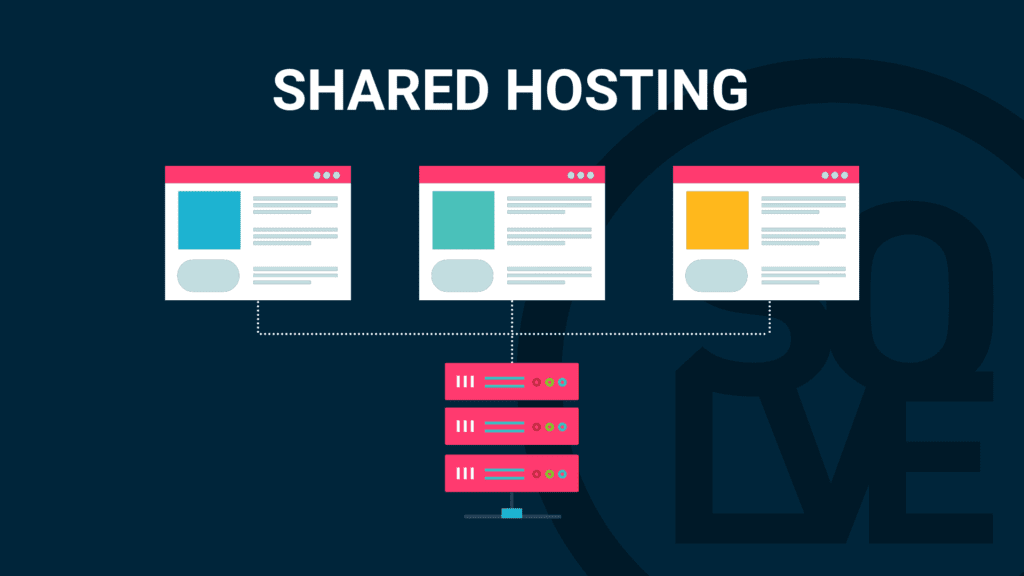
Shared hosting is where your website sits on the same server as other websites, and they all share its CPU, memory, storage and bandwidth. Because the cost of the server is split between everyone on it, it’s the cheapest way to get a site online.
Choosing web hosting is a bit like choosing a home. When you’re just starting out, your needs are minimal, so a room in a shared house might be just the budget-friendly ticket. That’s shared hosting.
- Perfect for small websites with less traffic
- The most cost-effective form of web hosting
- Available as optimised WordPress web hosting
But…
- The number of visitors and data transfers is usually capped each month.
- Site speed and security can be affected by the other sites on the server. If one of your “housemates” gets a surge in visitors, it can busy up the server and slow your site down.
To overcome some of these drawbacks, here at Solve we use trusted security plugins on all our hosted sites and run traffic through a Content Delivery Network (CDN) to keep connections fast and secure.
But what’s a CDN, I hear you say??? A CDN is a network of servers based in different locations around the world. It keeps copies of your site’s files closer to your visitors wherever they are, so pages load quicker. If you have US-based customers, for example, they’re served from a US location rather than waiting for data to cross the Atlantic.
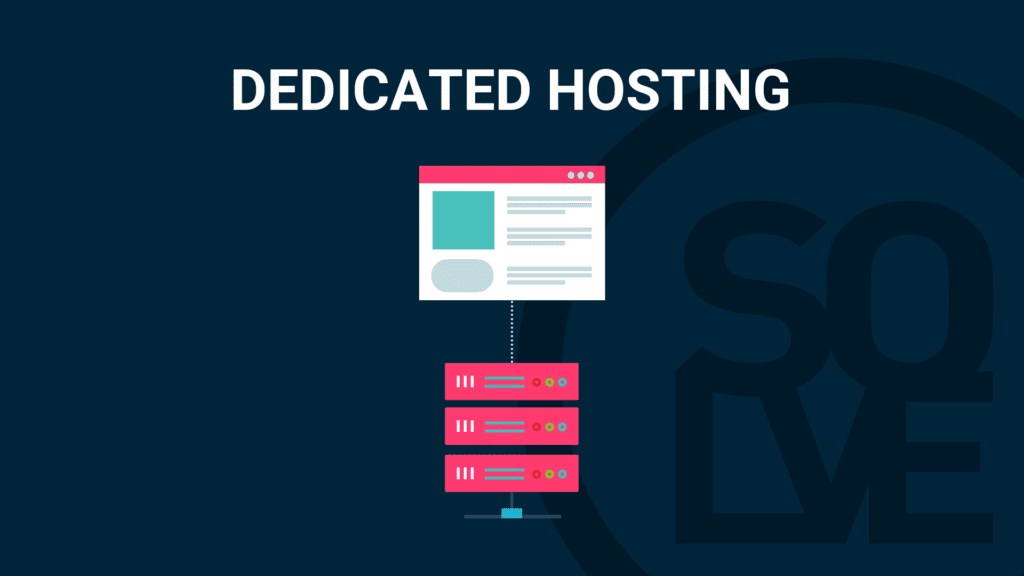
Here’s a summary of shared versus dedicated hosting:
What is dedicated hosting?
Dedicated hosting gives your website a whole server of its own. As your business grows, you need a bigger place: your own home, dedicated just to your family, with plenty of space for all the busy comings and goings.
- Best for big, established websites with lots of visitors
- Far more traffic and bandwidth headroom, so better for speed and SEO
- Available as optimised WordPress web hosting
But…
It’s more expensive, so you don’t want to be paying for server space you don’t need.
Here at Solve, we also offer a middle ground: our servers only host Solve-managed sites. You get the price tag of shared hosting with the enhanced security and optimisation of a much more controlled environment, because you’re only sharing with other sites we build and look after.
What are VPS and cloud hosting?
VPS (Virtual Private Server) hosting splits one physical server into several virtual ones, each with its own guaranteed resources. You still share the hardware, but your neighbours can’t eat into your slice. It’s a common next step for sites that have outgrown shared hosting.
Cloud hosting spreads your website across a network of virtual servers rather than one machine. If one server has a problem, another picks up the load, and resources can scale up during traffic spikes (a big sale, a press mention) and back down afterwards.
What is WordPress hosting?
WordPress hosting is web hosting that’s set up and optimised specifically for websites built on WordPress. The servers, caching and security are tuned for how WordPress works, and with managed WordPress hosting, the host also looks after updates, backups, security monitoring and speed for you.
It matters because WordPress is everywhere. According to W3Techs, WordPress powers 39.6% of all websites and 58.3% of sites using a known content management system (October 2026).
A WordPress site is inherently heavier than a simple static page: every visit can mean PHP code running and database queries firing to build the page. Basic, one-size-fits-all hosting often won’t cut it for anyone serious about their website and online presence.
WordPress hosting vs regular web hosting
Technically, WordPress will run on most standard web hosting. The difference is in what’s done for you:
| Standard shared hosting | Managed WordPress hosting | |
| Server setup | General purpose | Tuned for WordPress (caching, PHP, database) |
| Updates | You update WordPress and plugins | Host handles or monitors updates |
| Security | Basic firewall | WordPress-aware firewall, malware scanning, hack fixes |
| Backups | Often manual or extra cost | Daily, with quick restore |
| Support | General hosting help | People who know WordPress |
hy does that hands-on care matter? Because most WordPress security problems come from plugins, not WordPress itself.
Patchstack’s State of WordPress Security in 2026 found 11,334 new vulnerabilities in the WordPress ecosystem in 2025, up 42% on 2024, and 91% of them were in plugins. The same report found that 46% of vulnerabilities had no fix available when they were made public, and that heavily targeted flaws were typically being exploited within five hours. Generic host defences only blocked 26% of attacks in Patchstack’s testing.
In other words, “set it and forget it” hosting is a real risk for a business website. (Our guide on how to secure a WordPress site covers what you can do yourself.)
What you get with Solve’s managed WordPress hosting
- Fully managed: we look after everything from hosting setup to ongoing WordPress maintenance, so you needn’t worry about a thing.
- Hack protection guarantee: additional firewalls, monitoring and layers of protection that most hosts don’t offer. In the unlikely event you do get hacked on our optimised servers, we’ll fix it for free.*
- 99.9% uptime: that’s less than nine hours of downtime across a whole year.
- EU data centres (not USA): although our office is in Cornwall, our servers sit in European data centres. That’s good for UK and EU site speed, SEO and GDPR compliance.
- CDN bolt-on: if you have international traffic and SEO matters to you, we can add a CDN to put a copy of your site close to visitors worldwide.
- Advanced site speed: we often fine-tune sites on our servers for substantial speed improvements.
- Green by default: our servers run on 100% renewable energy (more on that below).
*Terms apply.

Why does good web hosting matter?
Your hosting is the foundation everything else is built on. A slow or insecure host will damage your online presence from day one, however good your design and marketing are.
1. Better website security
Good web hosting is a critical part of website security. Just like you take steps to secure your home from intruders, a good web host has firewalls to build a secure fence around your site, malware scanning to regularly patrol it for anything suspicious, and daily backups so your site can be restored quickly if anything does go wrong.
Here at Solve, every hosting client gets an SSL certificate to make sure connections between the server and your visitors’ browsers are encrypted. SSL shows the little padlock beside your address in the browser, browsers flag sites without it as “not secure”, and Google uses HTTPS as a ranking signal.
We have such robust procedures in place that we offer a hack protection guarantee: in the unlikely event of a hack, we’ll fix it for free.
2. Faster website performance
Web hosting is one of the biggest factors in how fast your website loads. If your server is underpowered, overloaded or a long way from your visitors, every page will drag. Some packages also cap how much data can be transferred or how many visitors you can have, and going over those limits slows things down. And users don’t like slow websites.
3. Less downtime
An overloaded server or a security breach can knock your site offline, and when your site’s down, you’re losing business. Hosts usually promise a percentage of “uptime”, and the small differences matter more than they look:
| Uptime guarantee | Maximum downtime per year |
| 99% | About 3.7 days |
| 99.9% | About 8.8 hours |
| 99.99% | About 53 minutes |
| 99.999% | About 5 minutes |
4. Improved user experience (and sales)
A secure, fast, reliable site is paramount for user experience, and happy users are good for SEO and sales. Deloitte’s Milliseconds Make Millions study found that improving mobile load time by just 0.1 seconds lifted retail conversions by 8%. Our article on site speed and conversion rates digs into the data.
5. Better search engine optimisation (SEO)
It’s not just users who like fast websites; search engines do too. Page experience, including load speed, feeds into how Google ranks pages, and a site that’s often down can’t be crawled or ranked at all. Hosts like Solve run servers optimised for WordPress, which makes for faster, smoother sites that are better for SEO.
6. Reduced environmental impact
Good web hosting can even be eco-friendly, and it’s becoming more important than ever before. The International Energy Agency estimates that data centres used around 415 TWh of electricity in 2024, about 1.5% of global consumption, and expects that to more than double to around 945 TWh by 2030.
Websites use energy 24/7, so where and how yours is hosted matters. At Solve, our clients know that while we’re working hard to make their website have a big impact online, it’s not having a big impact on the planet. Our eco-friendly web hosting is powered by 100% renewable energy, and we plant carbon-absorbing trees every month to offset other emissions. Find out more in our guide to what green hosting is and the benefits of sustainable web design.

How to host a website
If you’re setting up a new website (or moving an existing one), here’s the process in a nutshell:
- Work out what you need: How many visitors do you expect? Is it a brochure site, a blog or an online shop? What is it built on (for most businesses, WordPress)?
- Choose a hosting type: Shared or managed WordPress hosting suits most small and medium businesses; busy or complex sites may need VPS, cloud or dedicated.
- Pick a hosting provider: Use the checklist below.
- Register or connect your domain: Buy a domain name if you don’t have one, then point its DNS records at your new host.
- Install your website: Install WordPress (most hosts do this in one click) or migrate your existing site’s files and database.
- Secure it: Switch on SSL, set up a firewall, and make sure daily backups are running.
- Test and monitor: Check load speed, set up uptime monitoring and keep WordPress, themes and plugins updated.
Or skip steps 3 to 7 entirely: when we design and build your website, we can host, secure and maintain it for you too.
How to choose the best web hosting provider
There are so many hosting providers out there promising the world. Here’s what to look for:
1. Look for results
Ask for proof, not promises. Here at Solve, simply by switching to our web hosting servers, we’ve improved load times for clients by as much as 170%. Check out our hosting results.
2. Read reviews
Whether it’s Google reviews or Trustpilot, there are plenty of places to check whether a host backs up its claims. Check out Solve’s 5-star reviews.
3. Ask for guarantees
Good hosts that are confident in their service will offer guarantees. Look for an uptime guarantee of at least 99.9%, plus some form of security cover. At Solve, we offer a hack protection guarantee: if the unlikely happens, we’ll fix it for free*.
4. Choose servers close to your customers
If you want your site to be fast, reliable and secure, your servers should be near your customers. If you’re targeting UK or EU customers, choose a host with servers in Europe, which also keeps data handling simpler under UK and EU GDPR. If you want an international presence, look for a host that uses a CDN to serve your site from locations around the globe.
5. Check what’s actually managed
“Managed” can mean anything from automatic WordPress core updates to a team that monitors, patches and fixes your whole site. Ask who handles plugin updates, how often backups run, how fast you can restore one, and who you’ll actually talk to when something breaks.
6. Compare values
When choosing any partner, look at their values and ethics as well as their prices. As a certified B Corp, helping our clients make a big impact online without too much impact on the planet is very important to us. That’s why we choose to run our servers on 100% renewable energy. Find out more about what it means to be a B Corp.

Need web hosting advice?
Get in touch with the Perry at Solve to discuss the options for your business
Fast, secure, green WordPress hosting from Solve
So there you have it: an easy-to-understand, jargon-free, no-nonsense guide to web hosting.
If you’d like hosting that’s fully managed, optimised for WordPress, protected by our hack guarantee and powered by 100% renewable energy, take a look at our Performance Green Hosting. Or if you’d rather talk it through, get in touch with the web whizz kids at Solve today.

What is Web Hosting and Other FAQs
Do I need web hosting to have a website?
Yes. Without hosting, nobody else can see your website. Some website builders (like Wix or Squarespace) include hosting in their subscription, so you’re paying for it even if it isn’t listed separately.
Can I host a website myself?
Technically, yes, but it means buying and maintaining a server, keeping it secure, paying for a fast connection and fixing it when it breaks, at any hour. For almost every business, it’s cheaper and safer to use a professional host.
How much does web hosting cost in the UK?
It varies widely. Basic shared hosting can cost just a few pounds a month, managed WordPress hosting costs more because it includes updates, security and customer support, and dedicated servers cost the most. Watch out for low introductory prices that jump at renewal.
Is free web hosting OK for a business?
Rarely. Free hosts usually come with tight storage and bandwidth limits, ads on your site, no custom domain, weak security and little support. That’s fine for a hobby project, but not for a site that needs to win customers.
Does web hosting affect SEO?
Yes. Hosting affects your page speed, uptime and security, all of which influence rankings and user experience. Server location also affects speed for your target audience.
What’s the difference between WordPress hosting and web hosting?
WordPress hosting is a type of web hosting that’s optimised for WordPress sites. Managed WordPress hosting goes further, with the host handling updates, backups, security and performance for you.
Can I switch web hosts without losing my website?
Yes. Your files and database are copied to the new host, then your domain is pointed at the new server. A good host will handle the migration for you, usually with no downtime.
What is green hosting?
Green hosting is web hosting powered by renewable energy and/or offset with verified carbon reduction projects. Read our full guide to what green hosting is.